

SDR use cases
The following table summarizes the primary use cases for the SDR persona.Set up the SDR persona
1
Open Persona Management
In the Admin Console, click Persona Management and then + Create New Persona.
2
Configure the persona
- Name: SDR
- Behavior: “You are a Sales Development Rep. Help research prospects, generate personalized outreach, score ICP fit, build call scripts, handle objections, and create follow-up sequences. Ground all responses in CRM data, data warehouse signals, and public web intelligence.”
- Enable Memory: ON
3
Set permissions
Enable Access Connections, Access Knowledge Base, Use Email Tools, and Browse Web (SDRs need web research for prospect enrichment).
4
Assign skills
Assign the following skills to the persona:
- Prospect Research
- Email Drafting
- ICP Scoring
- Call Script Generator
- Objection Handling
5
Configure starter prompts
Add starter prompts tailored to the SDR role:
- “Research [company name] before outreach.”
- “Draft outreach email for [company name].”
- “Build a call script for [company name].”
- “Handle ‘we already have a tool’ objection.”
- “Which prospects should I prioritize this week?”
- “Build follow-up sequence for [contact name] at [company name].”
6
Assign users and go live
Assign your SDR team members to this persona. They will see the SDR-specific home screen on their next login.
Walkthrough: prospect research
This walkthrough demonstrates how the SDR persona handles a prospect research request end to end.1
Send the prompt
Open the Conversational AI and type:“Research [company name] and give me cold outreach angles for their Head of Data Platform.”
2
Review the enriched profile
The AI returns a multi-section prospect profile: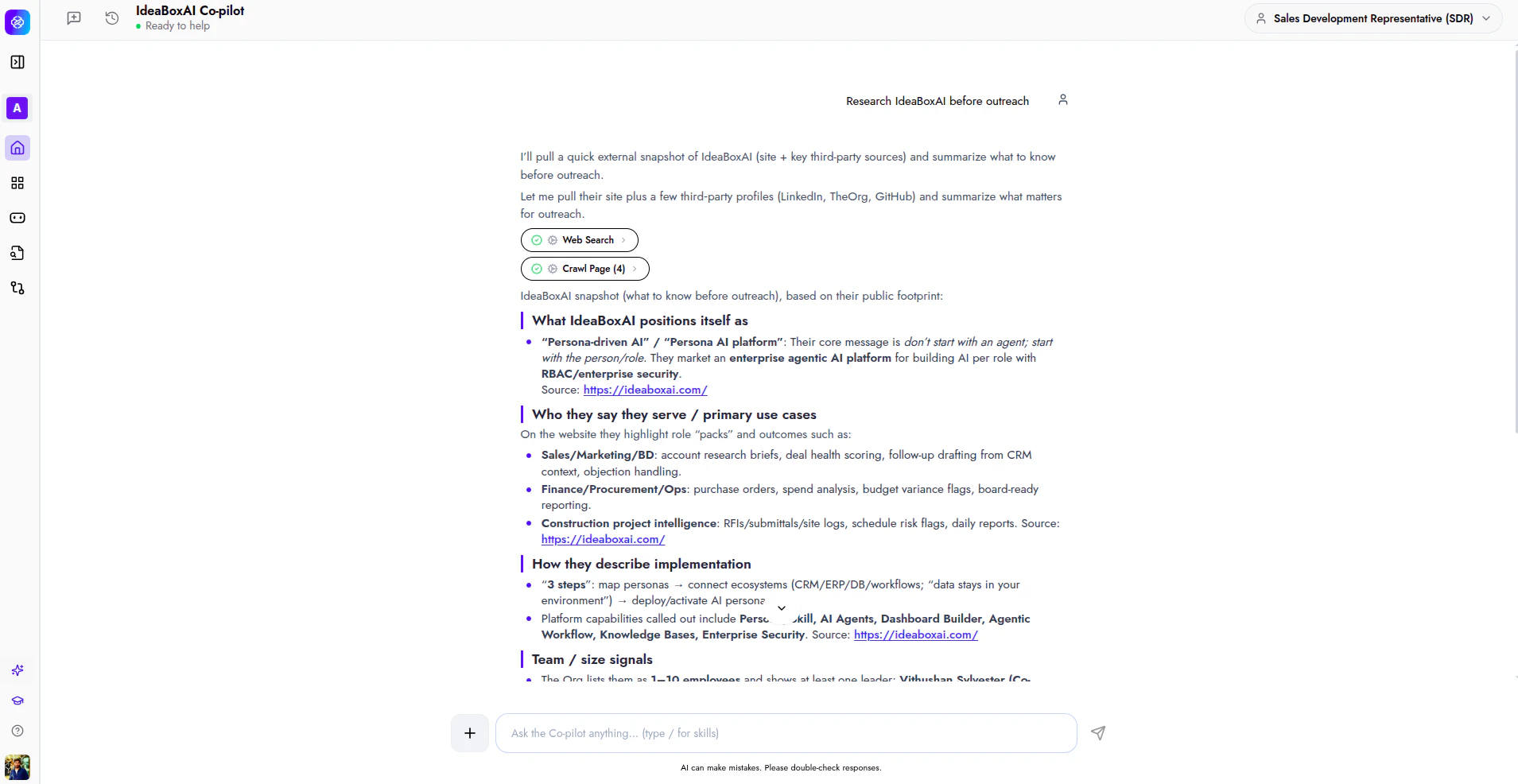
- ICP Score: A fit rating with rationale based on CRM data, hiring signals, and tech stack analysis.
- Company snapshot: Industry, revenue, employee count, recent funding, and key initiatives.
- Trigger events: Leadership changes, product launches, earnings calls, job postings, and expansion signals relevant to your value proposition.
- Pain points and hooks: Identified challenges mapped to your solution’s strengths, ready to use in outreach.
3
Take action
Click a suggested follow-up such as “Draft the cold email” or “Write a cold call script”, or type your own follow-up prompt. The AI retains the full prospect context.
Walkthrough: outreach drafting
This walkthrough shows how to generate personalised outreach emails from a prospect research result.1
Send the prompt
After completing prospect research (or in a new conversation), type:“Draft outreach email for [company name].”
2
Review the generated email
The AI produces a personalized email that includes:
- Subject line: Tailored to the prospect’s trigger events or pain points.
- Opening hook: A personalized reference grounded in real signals (not generic flattery).
- Value proposition: Mapped to the prospect’s specific challenges and tech stack.
- Call to action: A clear, low-friction next step.
- A/B variant: An alternative version with a different angle for testing.
3
Edit and send
Review the draft, make any adjustments, and click Send to deliver the email or Copy to use it in your email client.
Example starter prompts
The following starter prompts are recommended for the SDR persona. Each one maps to a common SDR task.- “Research [company name] before outreach.”
- “Draft outreach email for [company name].”
- “Build a call script for [company name].”
- “Handle ‘we already have a tool’ objection.”
- “Which prospects should I prioritize this week?”
- “Build follow-up sequence for [contact name] at [company name].”