

market-competition-research skill that always:
- Looks up information about a market or competitor.
- Reviews their positioning, pricing, strengths, and weaknesses.
- Writes it all up in the same clear format: a summary, competitor profiles, and a side-by-side comparison.
The Skills page
You build and manage skills on the Skills page. To open it, expand the More group in the left navigation and click Skills.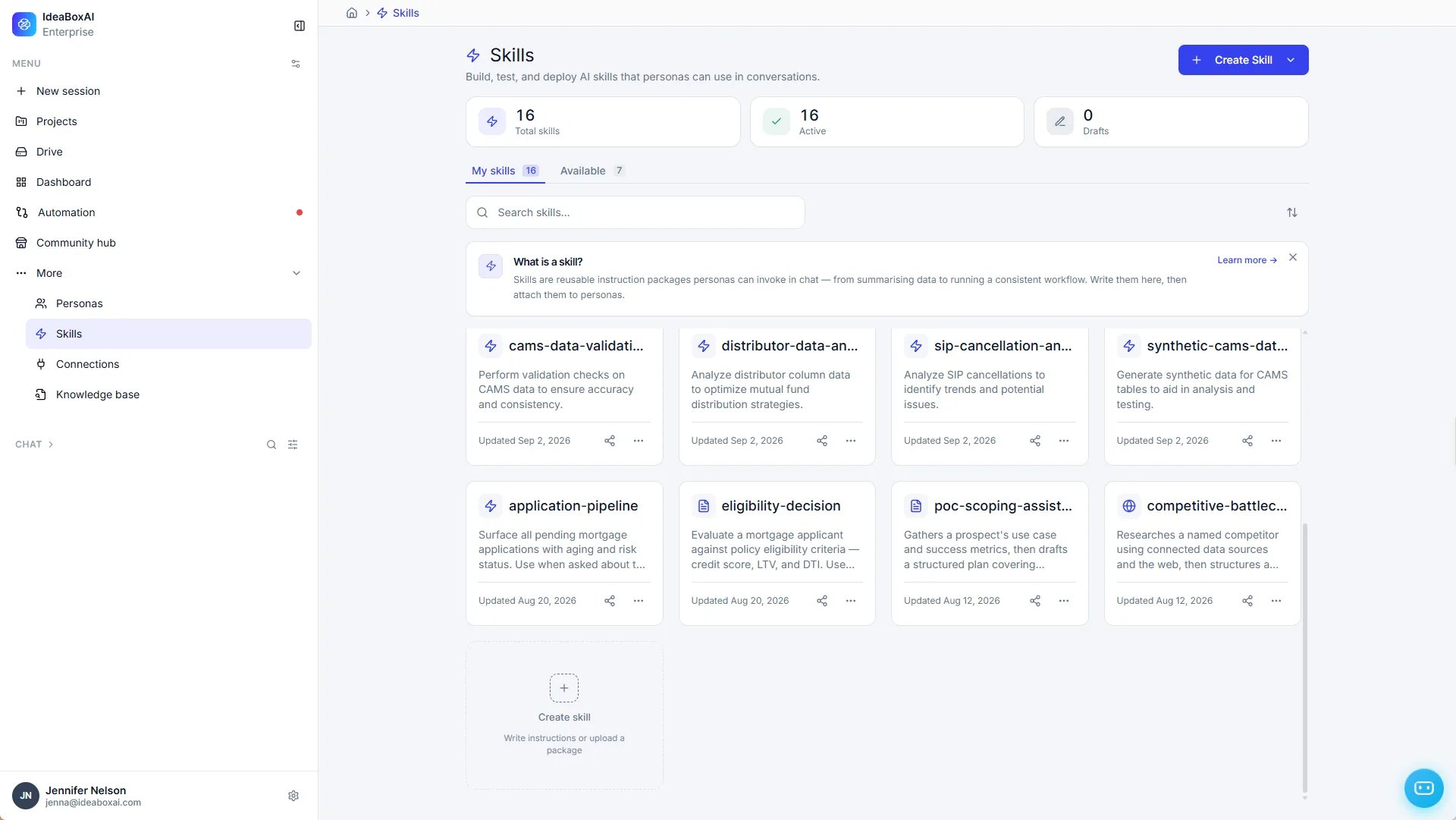
- Summary: See your Total skills, how many are Active, and how many are Drafts.
- My skills: The skills in your workspace. Each card shows the skill’s name, a short description, and when it was last updated. Use the share icon to share a skill, or the … menu for more actions.
- Available: Ready-made skills you can add to your workspace. Click Add to workspace on a skill to add it to My skills.
- Search and sort: Find a skill by name, or change the order of the list.
- Create Skill: Click Create Skill in the top-right corner, or the Create skill card, to write instructions or upload a skill package.
Use a skill in chat
There are two ways to use a skill in a conversation.- Let Persona AI choose: Persona AI detects when a skill fits your message and uses it for you, so you don’t have to remember which skill to pick.
- Pick it yourself: Type
/in the chat input and choose a skill from the list.
Skills and your workspace
Skills belong to your workspace. Once a skill is in your workspace, you can use it in any chat.- Create a skill: Click Create Skill on the Skills page.
- Add a ready-made skill: Click Add to workspace on the Available tab.
- Install a shared skill: Install it from the Community hub.
- Add a skill to a project: Add skills to a project to keep the right skills together for a piece of work. Skills added to a project are available in that project’s chats.
Personas set tone and behavior only. Selecting a persona doesn’t add or load any skills.
Find skills in the Community hub
You don’t have to build every skill yourself. In the Community hub, you can discover skills shared by your colleagues, check their ratings, install counts, and version, and install them in one click. You don’t need to choose a project to install a shared skill.Why skills are useful
Skills turn one-off instructions into a reusable capability your whole team can rely on.- Same result every time - Every chat that uses a skill follows the same steps and produces the same kind of output, no matter who’s asking.
- Reuse instead of repeat - Build a skill once and use it in any chat or project. You never have to write the same instructions twice.
- Easy for new people - New team members can use proven, ready-made workflows from day one, including skills from the Community hub.
- Update in one place - Change a skill once, and every chat and project that uses it is updated automatically.
- Works on its own - Persona AI can tell when a skill fits what you’re asking and use it for you.
Ready to build one? See Create a skill with the Persona AI or How to create a skill, then share it with your team using Share a skill.