

v1.4.357
This release covers Persona AI intelligence enhancements (question box, prompt enhancement), navigation and UI updates, Agentic BI dashboard improvements, an upgraded Skill editor, native Slack and Granola connectors, a new LLM routing engine, BYOK/hybrid model access, credit and seat management controls, expanded admin and platform controls, and automation navigation updates.Slack and Granola are now available as native first-party connectors, replacing the previous Composio-brokered integrations. Each connector uses its own OAuth flow, encrypted token storage, and automatic token refresh. There is no Composio dependency in the auth or data path. Sync failures are retried with backoff, and connector health (status, last successful sync) is visible directly in the UI. Existing users on the Composio-brokered connections will be prompted to reconnect to the native integration.
Persona AI
Question Box in Chat
When Persona AI needs a bit more context before it can give a confident answer, it now shows a focused question box directly in the chat. Instead of getting a vague response or having to rewrite the prompt, users can answer 1–3 targeted questions. Each with clear options and a free-text fallback. Then the Persona AI proceeds with the original task using those answers.The box closes after submission and collapses to a read-only summary in the thread. Skipping is always available; on skip, Persona AI states its assumptions and continues. The experience is fully keyboard-accessible and works at any chat width.Prompt Enhancement
A new Enhance Prompt button is now available next to the Persona AI chat input. Clicking it rewrites the current draft prompt for clarity, specificity, and structure by adding missing context, defining the desired format, and removing ambiguity. All before the prompt is sent. The enhanced version is shown in the input field so users can review or edit it before executing. The original prompt is not silently discarded; it can be reverted. If enhancement fails, the original prompt is sent without interruption.Navigation & UI
Recent Chats in Navigation
A collapsible Chats section is now available in the left navigation, showing recent conversations with their title, pin status, favorite indicator, and project name where applicable. Users can search across all chats (including archived ones), filter by project, status, sharing, and last-activity window, and manage conversations. Users can rename, move, pin, favorite, archive, share, or delete chats directly from the navigation without leaving the current page.Reordered Primary Navigation
The primary navigation has been reorganised to reflect how users actually work. Items are now grouped by workflow stage and ordered by real usage data, so the most-used areas appear first. All existing destinations remain reachable; no routes or items have been removed. Keyboard navigation and active states follow the new visual order.App Version Visible in UI
The running build version is now displayed in a persistent, low-prominence location at the bottom-right corner of the navigation and on the Settings → About page. The format isv<major>.<minor>.<build> (e.g. v1.4.357), with the environment name appended in non-production environments. The version is selectable and copyable for easy inclusion in bug reports.Pin Artifacts to the Side Navigation
Users can now pin any created artifact. such as documents, dashboards, generated files, directly to the side navigation bar for one-click access in future sessions. Pinned items persist across sessions and appear in a reorderable list alongside standard navigation items. An Edit/Done toggle in the menu header puts the sidebar into reorder mode, where items can be dragged to any position. Pinned items can be unpinned at any time, and are handled gracefully if the underlying artifact is deleted.Dashboard / Agentic BI (Beta)
This section covers features currently in Beta.
Refreshable HTML Dashboards
AI-generated HTML dashboards can now be refreshed in place. Clicking refresh pulls fresh data from the connected source, re-bakes the dashboard, and updates it without navigating away or starting a new chat. Dashboards can also be pinned directly from the Persona AI preview panel using a Move to Dashboard action.Auto-Pin When Moving to Dashboard
When a user clicks Move to Dashboard, the dashboard is now automatically pinned to the side navigation. It appears in the pinned artifacts section immediately and stays there across sessions. If the dashboard is already pinned, no duplicate is created, and users can manually unpin it at any time.Navigate to the Source Chat from a Dashboard
AI-generated dashboards now show a View source chat action in the dashboard header. Activating it opens the originating conversation and scrolls to the message where the dashboard was generated, so users can review the original prompt and context or continue the conversation without hunting through chat history. The action is only shown on dashboards that have a recorded source chat; if the source chat has been deleted, the action is hidden with a clear explanation.Skill Editor
Full-Screen and Dedicated Tab Mode
The Skill editor now supports two expanded editing modes. Users can expand the editor to fill the viewport in a full-screen mode without leaving the current context, or open it in a dedicated browser tab for longer editing sessions. Both modes include improved formatting support for structured instruction authoring (headings, lists, code blocks) and in-document navigation to move quickly through longer Skills. Save and autosave behaviour is consistent across all three modes, normal, full-screen, and dedicated tab.Connectors
Native Connectors for Slack and Granola
These native connectors replace the previous Composio-brokered integrations.
LLM Routing
LLM Routing V2
When Auto is selected in Persona AI, the platform now analyses each request before choosing a model. It will evaluate task type, complexity, context size, multimodal inputs, and cost. Then it will select the most appropriate model and reasoning level from the tenant’s permitted model list. Simple requests are routed to faster, lower-cost models; complex reasoning and long-context tasks go to higher-capability models. Routing decisions are logged (model selected, reasoning level, routing reason, outcome) and policies can be updated without a deployment.Query-Aware LLM Routing
Building on LLM Routing V2, each incoming query is now classified before execution so the routing decision is driven by the nature of the query itself rather than static rules. The classifier determines the best-fit model per request, improving response quality on complex tasks while keeping costs low for simpler ones.Model Access & BYOK (Beta)
This section covers features currently in Beta.
BYOK / Hybrid Model Access
Customers can now connect their own LLM provider credentials (OpenAI, Anthropic, Azure OpenAI, and other OpenAI-compatible endpoints) alongside platform-provided models. Once a connection is added and tested, customer-owned models become selectable in Persona AI Chat, Personas, Workflows, and Automations. Usage through customer-owned keys does not consume platform credits and is tracked separately in the Observability page. Credentials are encrypted at rest and never exposed after entry. The customer is responsible for all costs, compliance, and data handling associated with their chosen provider.User-Level LLM Access
Tenant admins can now control LLM model access at the individual user level, not just at the organisation or role level. Specific models can be enabled or disabled per user, and user-level settings override the broader role-level access. Users can only see and use models that have been enabled for them.BYOK Access Control via Roles & Permissions
BYOK is now a configurable permission within the Roles & Permissions framework. Tenant admins can enable or disable BYOK access for an entire role or for individual users. Enabling BYOK for a role or user requires explicit admin confirmation through a prominent popup that outlines the financial, privacy, security, and compliance responsibilities that transfer to the customer. Users without BYOK permission cannot access the BYOK configuration flow or use their own provider credentials.Credits & Seats (Beta)
This section covers features currently in Beta.
Credits: Limits, Warnings, and Top-Ups
Tenant admins now have full control over how AI credit limits are enforced. When usage reaches the limit, admins can choose to either pause all AI functions or continue with billable overage up to a configurable spending cap. Custom percentage-based warning thresholds (e.g. 50%, 75%, 90%) can be created in Settings; the 100% threshold always triggers and cannot be disabled. Credits reset at the start of each billing cycle and unused credits do not roll over. Admins can add credits at any time via the Add Credits flow.When credits are exhausted, regular users see a clear message and can submit a request for more credits, which notifies the admin via the Attention section and email.Concurrent Seats — Limits, Requests, and Increase
The platform now enforces concurrent seat limits per tenant. A seat is freed when a session times out or the user logs out. When all seats are occupied, users attempting to log in see a clear message and can either request access (which notifies the admin in the Attention section with the requester identity and timestamp) or try again later. Admins can view current seat usage in real time and purchase additional seats via the Increase Seats flow.Global Credit Warning Banner
A top-navigation banner now surfaces AI credit threshold warnings before an admin needs to drill into the Admin Console. Admins see the banner at any threshold they have configured; regular users only see it when usage reaches 100%. At sub-100% thresholds the banner is dismissible; at 100% it is non-dismissible for all users and persists until credits are added or a new billing cycle begins.Admin & Platform Controls (Beta)
This section covers features currently in Beta.
Platform Admin Configurable Parameters
Platform admins can now configure key tenant parameters such as licensing, seat counts, plan assignment, billing status, credit balances, usage limits, and feature flags. These parameters can be accessed directly from the Admin Console without requiring engineering involvement. All changes are logged in an audit trail with the actor, timestamp, and previous value. Guardrails prevent invalid states (e.g. setting seats below the active user count), and high-risk changes require confirmation before applying.Tenant Observability Report — API Usage Consolidation
A new API Consumption section in Platform Console pulls LLM usage and cost data directly from Langfuse, replacing the previous manual spreadsheet-export workflow. The report shows total API cost, active API keys, and models used, broken down by environment, API key × model, and token type. All three breakdowns reconcile to the same total. A shared time-period selector and provider filter apply consistently across every card, table, and download. API key secrets are never exposed in the UI or in downloads. The architecture is designed to support additional providers beyond the initial Anthropic phase.Independent Add User Gate and Per-Tenant Invite Domains
The Add User and Bulk Invite controls are now independent per tenant; either or both can be enabled without one affecting the other. Invite domain rules can now be configured per tenant, replacing the previous single deployment-wide list. The domain rule is enforced consistently at all user-creation paths (password login, SSO, self-signup, admin Add User, and bulk invite) through a single shared resolver, so a domain that is blocked cannot be worked around by using a different entry point. Accepting an invitation now correctly lands the user in the inviting tenant’s workspace.Automations (Beta)
This section covers features currently in Beta.
Automation HITL Beacon in Navigation
A beacon now appears next to Automations in the navigation whenever an automation requires user attention. A green beacon indicates completed outputs are ready to review; a red beacon indicates pending HITL approvals, connection issues, or other items requiring action. The beacon clears when the user navigates to the Automations page, regardless of whether individual items have been resolved.v1.4.203
This release adds bulk user invites, admin-initiated password resets, a new Usage and Cost dashboard, workspace-wide model controls, a rebuilt Roles and Access system, and a native Google Workspace connector.
User management: bulk invite
Admins can now invite multiple users in a single flow instead of one at a time. Paste a list of email addresses, separated by commas, semicolons, spaces, or line breaks, or paste directly from a spreadsheet, then select a role and optionally attach a department and a starting persona.Before anything is sent, the platform checks each address: new addresses are queued for invite, already-active users are skipped, and previously deactivated users are flagged for reactivation. Invalid addresses are highlighted without blocking the rest of the batch from going out.When a persona is included in the invite, each new user receives their own independent copy of it on first login, including its skills. Editing or deleting the original persona afterward has no effect on copies already distributed.Admin-initiated password reset
Workspace admins can now trigger a password reset directly from a user’s record in User Management. The user receives a secure, single-use link, valid for 24 hours, to set their own password. No password is ever generated, displayed, or sent by the admin. The existing self-service “Forgot password” flow remains available to all users at any time, and every reset, whether admin-initiated or self-service, is recorded in the audit log.Usage and cost (beta)
A new Usage and Cost section in the Admin Console gives workspace admins tenant-level visibility into how the platform is being used and what it is costing.- Overview dashboard: see total credits consumed, credits remaining, active user count, and average credits per user, over a selected time window (7 days, 30 days, 90 days, 1 year, or a custom range), with both daily and cumulative views.
- Usage over time: a chart tracks activity across the selected period.
- Breakdown by model, feature, and provider: see exactly where credit spend is going.
- Drill-down views: explore usage by user, project, or persona, each with last-active timestamps, an activity heatmap, and credit spend, with a detailed view available for any individual user.
AI Models: workspace model control
Admins can now control which AI models are available to users across the workspace, from a new AI Models section in the Admin Console. Models are grouped by provider (Anthropic, OpenAI, Bedrock, Z.AI, and others) and can be individually enabled or disabled. Disabling a model removes it from everyone’s model picker immediately, with no action needed on each user’s end.This release also expands the platform’s model catalogue with support for additional providers, including Z.AI (GLM 4.6 and others, available via Bedrock).Roles and access (beta)
A rebuilt Roles and Access section in the Admin Console gives admins fine-grained control over what different users can see and do on the platform.- Custom roles: create a role from scratch, or duplicate an existing role as a starting point.
- Permission grid: configure each role by resource (Persona AI, Personas, Skills, Dashboard, Knowledge Base, Drive, Automations, Connections, and more), with per-action controls where applicable: View, Create, Update, Delete, Share, and Converse. A few surfaces, like Profile and Usage and Business DNA, use a simpler on or off toggle.
- Navigation follows permissions: any section a user does not have View access to is hidden from their navigation entirely.
- Two default roles: a System Admin role (full access, cannot be edited or removed) and a User role (read-only access to everyday content). Admins can create additional roles and assign them at invite time or from any user’s record.
- A role cannot be deleted while users are still assigned to it. Admins are shown how many users are affected and must reassign them first.
Roles and Access is in beta, and permission enforcement is still catching up to the new permission grid in a few places. Most notably, view-only permissions do not yet fully prevent creating or editing content, and some sections may still appear in navigation even without read access. If you are relying on custom roles as a security boundary today, treat this as a work in progress rather than a fully enforced restriction, and check back as this matures out of beta.
Google Workspace connector
Google Workspace is now available as a native connector, providing a single connection point for Gmail, Google Drive, Google Calendar, Google Docs, and Google Sheets. This replaces the previous connectors for these services, which had reliability issues.Fixes
This release includes a large number of fixes across the platform:Persona AI
- Sessions that were frequently ending mid-conversation are now stable.
- Screens no longer go blank after a response finishes, so you should not need to manually refresh to see output.
- Fixed an issue that could intermittently sign you out mid-conversation due to session token expiry.
- Long tasks no longer hit an internal limit that previously caused failures in both chat and Automations.
- Multi-select clarifying-question prompts now show a proper checkbox tick instead of highlighting the entire option.
Automations
- Jira permission failures now correctly show as errors instead of a false success message.
- Automations pulling recent Jira issues no longer return empty results.
- Email automations with attachments now reliably deliver the attachment.
- Automations no longer generate a broken file when a result set is empty.
- Fixed scheduling errors that were blocking schedule creation.
- Automations created through Persona AI no longer show a false “status change failed” message, and a “finished” notification no longer appears prematurely on every message sent.
- Files generated by an automation run, such as exported presentations, are now automatically saved to Drive.
- Fixed export steps that were failing due to a formatting error.
- Automations no longer create a stray empty chat session when built through Persona AI.
- Schedule information is now visible directly in the Automations list, and automation chat history now persists across page reloads and when navigating away.
- Approval steps now correctly wait for input at the right point in the workflow rather than upfront.
- Automations are now correctly scoped to your active persona, matching how chat sessions work.
- Fixed an error that appeared when pausing a workflow, even though the pause itself succeeded.
- Automation creation now more reliably surfaces the right connectors for what you are asking for.
Drive
- The search bar now correctly filters your file list, and the “All sources” filter works correctly again.
- Shared folder badges now show consistently in both grid and table view.
- Persona AI can now read nested sub-folder contents when referencing a folder in Drive.
- Fixed an issue where the Drive interface could get stuck after renaming a folder.
- Multi-sheet Excel files now render each sheet as its own tab instead of one long scroll.
- Fixed a failure writing files back to Google Drive.
Knowledge Base
- Duplicate entry names are now prevented, removing ambiguity when Persona AI selects context.
- Reindexing a Knowledge Base now correctly picks up schema changes, like new columns, from the source database.
SQL editor
- Selecting a table from the navigator now automatically loads the correct schema and database.
- Manually typed or pasted queries now correctly show the New Query and Save options.
- Saved query lookup by name, sidebar name updates, and the enable and disable toggle all work correctly now.
Connections
- Zoho Mail connections now appear immediately after setup.
- The Granola connector no longer shows as connected when it is actually failing.
- Google Drive connections marked active now work correctly when used from Persona AI.
Usage and cost
- Fixed sync issues affecting last-active timestamps, credit counts, and activity data for SSO users.
- The custom date range picker in user-level drill-downs now works correctly.
- Fixed incorrect persona data showing for SSO versus non-SSO users, and restored Bedrock model availability after a temporary outage.
Admin Console
- Fixed a navigation bug where clicking Roles in Security incorrectly opened the Users tab instead.
User management
- Addressed several issues and pieces of feedback identified during initial bulk invite testing.
v1.4.106
This release adds Persona AI notifications, a new Automations module, upgraded Drive storage, and a SQL editor for structured Knowledge Bases.
Persona AI notifications
You no longer need to wait for a Persona AI response before switching tabs or navigating elsewhere in the app. Once a response is ready, the platform notifies you automatically.- In-app toast: a notification appears when you are in another module within the app.
- Browser notification and favicon indicator: when you have moved to a different browser tab entirely, a browser-level notification and favicon update signal that your response is ready.
- Human-in-the-loop alerts: you are also notified when an automation or task needs manual input before it can continue. Notifications, including sound, can be turned on or off from the notification settings in the top bar.
Workflow automations (beta)
A new Automations module lets you build, schedule, and monitor multi-step AI-powered workflows, all from the same Persona AI interface. This feature is in beta while it is still being actively developed and tested.- Create automations via Persona AI: describe the workflow you want in natural language. Persona AI breaks it down into steps, assigns the right skills and connectors, and sets it up as a runnable automation, with example templates provided as a starting point.
- Scheduled and manual triggers: run an automation on a schedule, such as daily at a set time, or trigger it manually on demand.
- List and canvas views: view the automation detail page as a step-by-step list or a visual canvas overview of the whole workflow.
- Run history and outputs: inspect any past run, view the output at each step, and see the final result, including success or failure status and execution time per step.
- Automation overview dashboard: a summary dashboard shows your total automations, active, paused, and draft counts, recent outputs, and any automations that need attention.
Drive: folders and file upload
Drive now supports team storage, making it a shared workspace for both Persona AI-generated and user-uploaded files.- Folder organization: create folders and sub-folders to organize your files, with a breadcrumb trail for easy navigation.
- File upload: upload files (PDFs, CSVs, spreadsheets, documents, and more) directly into Drive, into any folder. Uploaded and Persona AI-generated files live side by side in the same space.
- Persona AI access to Drive files: Persona AI can browse Drive folders, list their contents, and use uploaded files as context, including summarizing documents, extracting data, or answering questions based on what is inside them.
- All sources filter: filter files by source, Persona AI-generated or uploaded, to quickly find what you need.
Fast vs. thinking mode
Persona AI now supports two response modes, selectable from the chat input bar.- Fast mode: the default. Optimized for quick, direct responses to everyday tasks and queries.
- Thinking mode: Persona AI works through a reasoning step before responding. Best suited for complex analysis, multi-step tasks, and nuanced questions where accuracy matters more than speed.
Branding: project-level and org-level customization
Branding in the Admin Console now supports two levels of customization.- Organization level: branding changes apply across the entire workspace, for all users and projects.
- Project level: apply different branding to individual projects, so different teams or client-facing workspaces can have their own identity, colors, and typography. Admins can switch between organization and project scope using the selector in the Branding page header.
Knowledge Base: SQL editor
Structured Knowledge Bases now include a built-in SQL editor, giving you a direct interface to query connected data sources, including databases, CSVs, and Excel files, with full AI assistance.- Natural language to SQL: describe what you want in plain language, and AI generates the SQL query for that data source automatically using the “Suggest SQL” option.
- Run, validate, and format: run queries directly against the connected data source, validate them for syntax, and auto-format them for readability. Results show inline with a row count, and can be exported to CSV.
- Save queries: save and name queries within the Knowledge Base for reuse. Saved queries are available to Persona AI when answering questions on that Knowledge Base, giving it a curated, pre-validated set of queries to draw from.
- Save Persona AI-generated queries: save a SQL query Persona AI generated during a chat session back to the relevant Knowledge Base, directly from the conversation.
Fixes
This release also resolves a number of issues, including Persona AI disconnecting during long-running tasks, Persona AI stalling with no response during task execution, chat messages appearing out of order, Persona AI fully reloading when opening an older chat, skill updates made via chat not persisting, skill version history not updating after a chat-based edit, Knowledge Base reindexing not picking up source database metadata changes, and several blocking issues in new user onboarding.v1.4.0
This release adds sharing and version history across the Persona AI platform, a new Drive to hold every file your personas generate, and workspace branding controls for admins.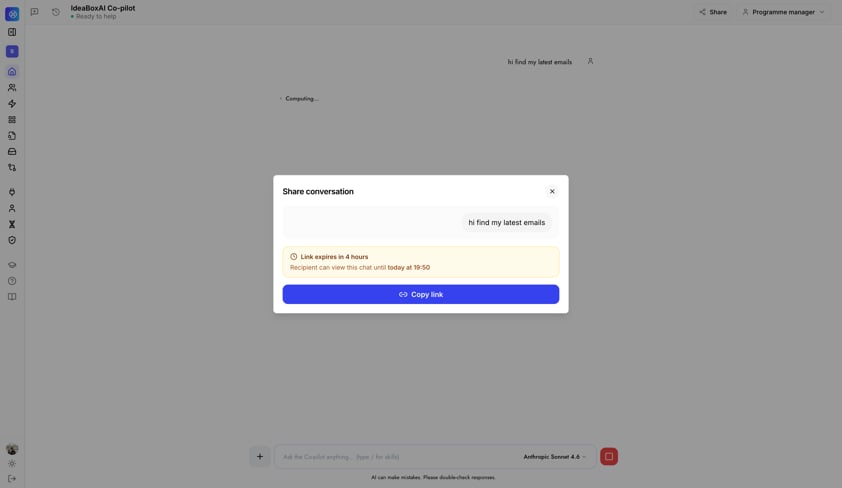
Sharing and collaboration
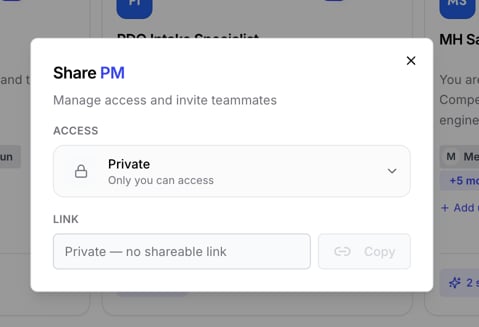
Share a conversation. Generate a link to any Persona AI chat session from the Share button at the top of the chat window. The recipient can view the full conversation and continue chatting from exactly where it left off. Shared links are time-limited and the exact expiry is shown to you at the moment you share.- Private (default): only you can access the persona.
- Organization: anyone in your workspace can access and use it.
- Public: anyone with the link can access it.
Versioning
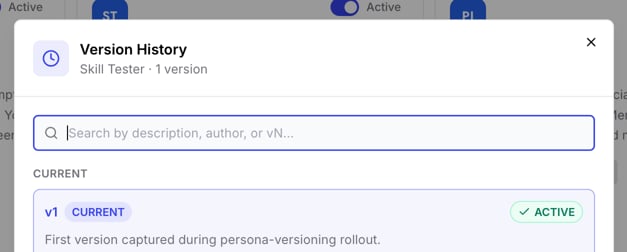
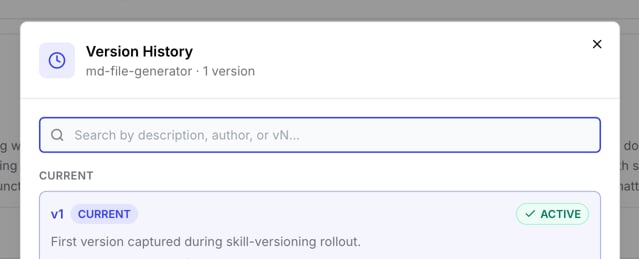
Persona version history. Every edit to a persona now creates a new version automatically. Open the version history panel to see each past version, review what changed, and promote any earlier version back to active, without losing your current configuration.Drive
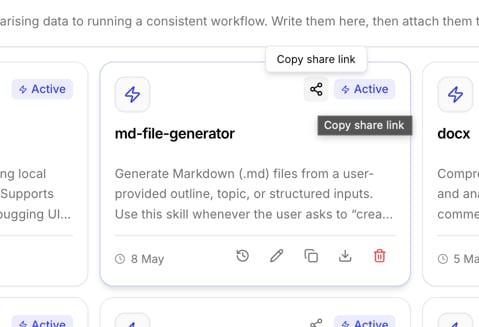
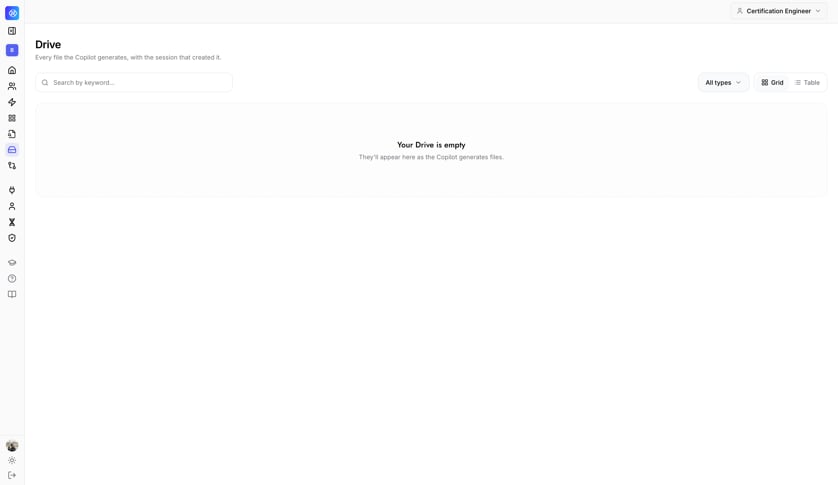
A new Drive section in the sidebar acts as a central store for every file your Persona AI generates. Each file links back to the session that created it, so you can always trace a file to its original conversation.- File management: download, share via a copy link, or delete any file straight from Drive.
- Edit in Persona AI: reopen any Drive file and continue editing it by launching it back into a Persona AI session.
- Session navigation: jump from any file card back to the conversation that generated it.
- Grid and table views: browse your files as a visual grid or a sortable table, with keyword search and file-type filters.
- File versioning: when a file is regenerated or updated, Drive automatically keeps the new version accessible from the file’s detail page.
Dashboard
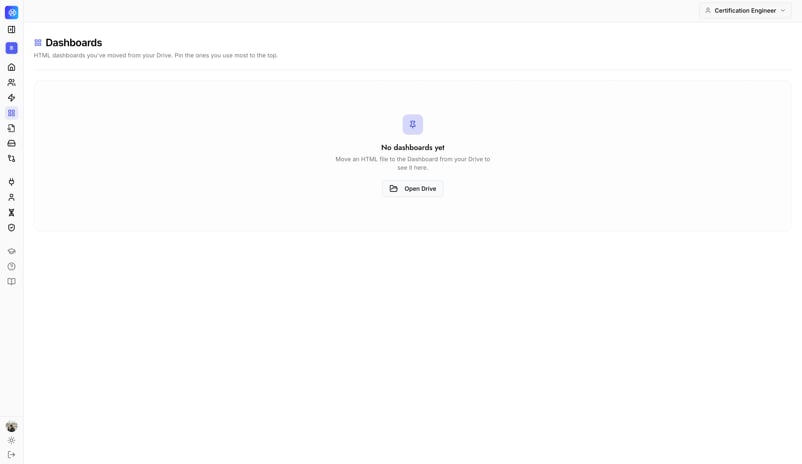
- Move artifacts to your Dashboard: any HTML artifact your Persona AI generates (a chart, a report, an analysis page) can be moved straight to your Dashboard from the artifact preview, giving you one dedicated place to collect your key outputs.
- Pin your favorites: pin the dashboards you use most often to the top of the list for faster access.
Admin Console: branding
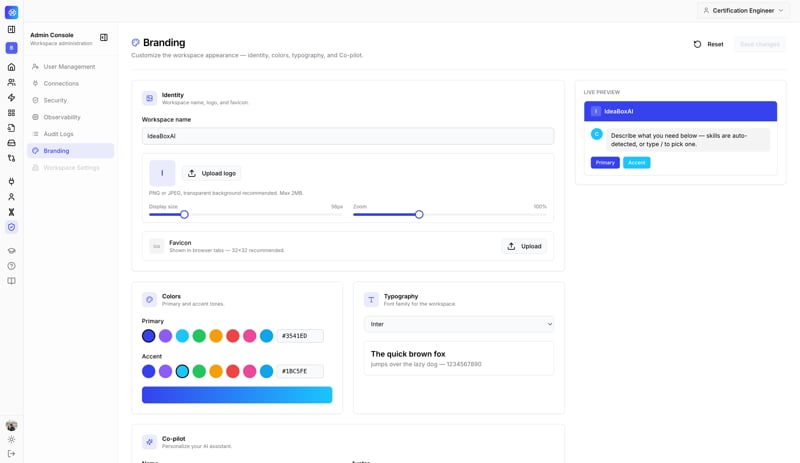
Workspace admins can now customize how the workspace and Persona AI look, from a new Branding section in the Admin Console:- Identity: set the workspace name, upload a logo (PNG or JPEG, up to 2MB), and configure a favicon for browser tabs.
- Colors: customize primary and accent color palettes using a color picker or hex input.
- Typography: choose the workspace font from the available options.
- Live preview: every branding change updates instantly in a live preview panel before you save.
- Reset to default: restore the default IdeaBoxAI theme at any time.
v1.3.0
This release introduces IdeaBoxAI Persona AI, a persona-driven AI assistant that adapts to your role, along with a redesigned navigation, an integration framework connecting 1,000+ tools, and a guided self-service onboarding flow.
IdeaBoxAI Persona AI
Persona AI core- Landing page and chat interface: a dedicated landing page shows your recent session history with one click to start a new chat. Getting-started prompts are personalized based on your own prior interactions.
- Persona system: every user is assigned a role-specific persona that shapes Persona AI’s behavior, skills, and available workflows. You can switch personas mid-session.
- Skills and knowledge: equip your persona with skills and connect knowledge bases and integrations, so Persona AI can take actions, retrieve context, and generate outputs tailored to your role and your data.
- Memory: Persona AI remembers context across sessions for each persona, so it becomes more useful the more you use it.
- Chat history management: every conversation is stored and searchable, with options to pin, rename, and delete sessions. Each session links back to the individual messages within it.
- Model switching: switch between supported AI models directly from the chat interface. The active model is always shown in the chat input bar.
- Web search and browse: Persona AI can search the web and read live web pages to bring in current information and external context in real time.
- Document and artifact generation: using built-in sandboxed execution, Persona AI can produce and download richly formatted documents from the chat: HTML reports, PowerPoint presentations, Word documents, and PDFs, without leaving the conversation.
- AI image generation: generate visuals directly from the chat interface using the dedicated image-generation model option.
- File and image attachments: attach files (like PDFs and documents) and images (PNG, JPG, and more) to a conversation to give Persona AI extra context.
- Skill creation via chat: describe a new skill directly in the chat, and Persona AI creates it and assigns it to your active persona automatically, with no manual configuration needed.
- Admin Console: a full management surface for admins, covering user management, org-level connection approvals, observability, role-based access control, and an audit log with CSV export.
- User settings: self-service profile management, including your personal integrations and usage activity.
Navigation and UI revamp
The sidebar has been redesigned around three clear groups: Menu (core product areas), Settings (configuration and profile), and Support (help and documentation), with content organized by project so everything tied to a workspace is easier to find.- Personas and Skills have moved out of the Admin Console and into the main Menu, so any user can create and manage them without needing admin access.
- Connections has moved from a nested tab under Settings to a first-class item in Settings, making it faster to reach.
Integration connectors
A new integration framework lets Persona AI read from and write to the external business tools you already use, with authentication handled transparently.- Connection management: browse available connectors, connect, view connection status, and disconnect, all from a dedicated Connections page. Connections are managed per user.
- 1,000+ connectors: access over 1,000 tools and services out of the box, spanning CRMs, productivity suites, communication tools, data platforms, and more.
- Dynamic connector registry: new connectors can be added over time without requiring you to do anything on your end.
Freemium onboarding
A guided, self-service setup flow takes new users from sign-up to a fully configured, personalized workspace with no admin required.- Sign-up and onboarding wizard: a multi-step wizard tracks your progress and resumes from the last step if you drop off and come back later.
- About you: tell us your company name, website, functional area, and a short business description. Everything auto-saves as you go, and an “Improve with AI” option can rewrite your description for you (with the option to accept or revert).
- Persona selection: see an AI-generated summary of your company alongside a ranked set of suggested personas matched to your context. Pick one, or create your own custom persona.
- Data setup: connect a live data source, or start with AI-generated sample data seeded from your company context, while your workspace is prepared.
- Workspace launch: watch your workspace get built in real time, then land in it fully configured, complete with an interactive in-app tutorial.
- Business DNA: after launch, refine your business context at any time and regenerate persona suggestions to match.
- Credits and wallet: freemium users receive 10,000 credits per week, with in-app alerts as you approach your limit.
Help Center
- In-app Help Center: get guidance on using the platform without leaving it. Answers are backed by search over IdeaBoxAI’s documentation, with citations back to the source articles.
- Feedback and bug reporting: submit feedback or report a bug directly from the Help Center.
Usage and observability
- Your usage: see your own credit consumption and model-level usage breakdown, with 7-, 30-, and 90-day views.
- Admin usage view: admins can see the same data aggregated across the whole workspace.
Knowledge Base
The Knowledge Base creation flow has been redesigned for a smoother, more guided experience when adding, indexing, and managing your knowledge sources.Dashboard experience (beta)
A full refresh of the dashboard list and detail pages for a faster, more interactive experience. All of your existing dashboard workflows (viewing, editing, renaming, deleting, and theming) continue to work exactly as before.- Refreshed list page: a sticky search toolbar, sortable columns, and a List/Grid view toggle, with an inline actions menu on every card for Open, Rename, Duplicate, and Delete.
- Dashboard metadata at a glance: see the dashboard name, creation date, and creator directly in the list view.
- Grid view with thumbnails: switch to Grid view to see a visual preview of each dashboard’s chart layout.
- Inline duplicate, rename, and delete: manage dashboards directly from the list, with a confirmation step before anything is deleted.
- Last refreshed timestamp: always see when a dashboard’s data last updated.
- Refresh scheduling: configure an automatic refresh schedule, or trigger a manual refresh on demand.
- Chart hover actions: hover over any chart for quick access to copy, edit, delete, and chart-type options.
- AI-assisted chart editing: open the Dashboard Agent from any chart to describe a change in natural language: a new filter, a different chart type, a rename, and have it applied without leaving the page.
v1.2.0
This release makes it easier to explore data conversationally and to understand what your charts are actually telling you.Navigate data hierarchies with one click. Roll up and down through levels like year, quarter, and month. The whole chart transitions between levels at once, without needing to select individual data points. A level indicator always shows you where you are (for example, “Quarter · Level 2 of 3”), and your active global filters stay applied at every level.Build and edit dashboards by chatting. Describe the dashboard you want in plain language, and the Dashboard Bot handles the rest: discovering the relevant data, generating titles, layouts, KPI cards, and charts, and applying edits as you ask for them. Every chart creation or query change shows you a preview before anything is saved, and any change that would remove an existing connection between charts is flagged clearly before you confirm it.AI Insights on every chart. Each chart now includes an AI Insights card with four layers of context:
- Summary: a concise description of what the chart shows.
- Business impact: what the pattern in the data means for your business, including risks, opportunities, and suggested actions.
- How it’s calculated: how the insight is derived from your underlying data.
- Key highlights: the most important patterns and changes to pay attention to.
v1.1.0
This release adds new ways to get a dashboard up and running fast, and smooths out onboarding for new users.Turn a spreadsheet into a dashboard. Upload a CSV or Excel file (including multi-sheet files) and the AI agent analyses it to automatically generate a relevant dashboard with appropriate charts, KPIs, and metrics. No data pipeline setup required.Give Persona AI more context. When generating a dashboard from an uploaded file, you can now also attach a reference document or Standard Operating Procedure. The agent uses it to better understand your terminology and business rules, resulting in more accurate, domain-aware dashboards.One-click cube recommendations. In the Knowledge Base, click Recommend Cubes to have AI analyze your available data sources and automatically generate relevant cube configurations, alongside the existing manual and natural-language creation options.Simpler sign-up for new users. New users can now register through a dedicated freemium sign-up flow and complete an onboarding form to personalize their workspace, all without needing an admin invitation.More control over your charts.
- Global filters: add a filter that can control multiple charts at once, and choose exactly which charts respond to it.
- Table column filters: filter table charts by individual columns for more granular data exploration.
- KPI chart drilldown: configure a KPI chart to drill into more detail, either through specific drill members or by setting another chart or table as the drilldown target.
v1.0.0
This is the foundational release of the IdeaBoxAI platform, introducing AI-driven analytics, a smarter knowledge base, and conversational agents.Agentic BI Discontinued. AI-generated dashboards, built automatically from your business context and available data.
- AI-generated dashboards: created automatically based on your business context and data.
- Automated metrics and visualizations: the AI selects relevant KPIs, metrics, and chart types for you, with no manual configuration required.
- Manual and drag-and-drop editing: fine-tune any dashboard by hand whenever you want full control.
- Foundational analytics and insights: baseline trends, summaries, and performance indicators out of the box.
- AI assistant for dashboards: an embedded assistant explains metrics, trends, anomalies, and relationships in plain language, so both business and technical users can work with the same dashboard.
- Cube modeler creation: build cube modelers through a simple, AI-powered workflow, right from the Knowledge Base.
- Natural language query-based creation: describe what you need in plain language; no data-modeling expertise required.
- AI-powered cube generation: an AI agent interprets your request, generates the cube configuration, and prepares it for deployment.
- Automatic deployment: your cube modeler deploys automatically, with no manual setup.
- Seamless dashboard integration: new cube-based metrics are instantly available for visualization in your Agentic BI dashboards.
- Natural language querying: ask questions in plain language to explore your data, metrics, and insights.
- Insight explanation: AI agents explain results, trends, and anomalies with context.
- Agent-orchestrated actions: agents drive dashboard generation, cube modeling, and analytics workflows end-to-end.
- Context-aware intelligence: agents draw on your Knowledge Base and cube models for accurate, consistent answers.