> ## Documentation Index
> Fetch the complete documentation index at: https://docs.ideaboxai.com/llms.txt
> Use this file to discover all available pages before exploring further.
# Knowledge Bases overview
> Centralize structured and unstructured data for Agentic BI, AI agents, and automation workflows.
Knowledge Bases in IdeaBoxAI centralize structured and unstructured data for Agentic BI, AI agents, and automation workflows. This guide covers the complete lifecycle from creation through querying.
## Access the dashboard
The Knowledge Bases section is accessible from the **Knowledge Bases** item in the left navigation sidebar. The dashboard displays a searchable table of all existing knowledge bases.
The table includes the following columns.
| Column | Description |
| ----------------- | ----------------------------------------------- |
| **Name** | The knowledge base name. Sortable. |
| **Status** | Processing state, **Created** or **Processed**. |
| **Type** | **Structured Data** or **Unstructured Data**. |
| **Created By** | The user who created the knowledge base. |
| **Last Modified** | Date and time of the last change. Sortable. |
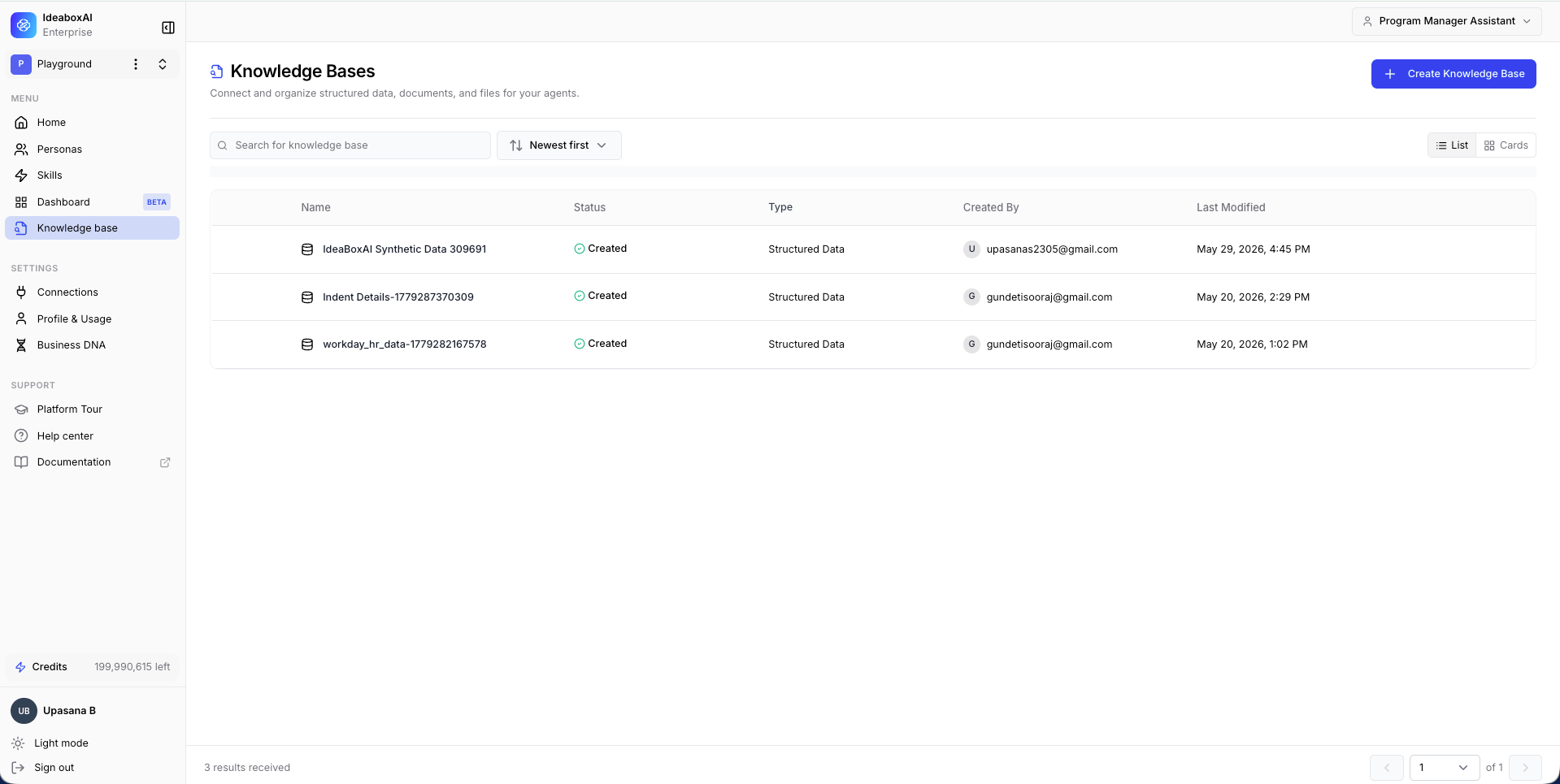 From the dashboard you can:
* Search for an existing knowledge base by name.
* View metadata and processing status at a glance.
* Click **+ Create Knowledge Base** to start a new one.
Use clear and consistent naming conventions for knowledge bases to help your team quickly identify the right data source for each task.
**Best practices**
* Review the **Last Modified** column to track stale knowledge bases.
* Limit KB creation to meaningful datasets to avoid fragmentation.
* Document the purpose and scope of each knowledge base clearly.
## Create a knowledge base
### Select the knowledge base type
Click **+ Create Knowledge Base** from the dashboard. A modal presents three types.
| Type | Description | Supported formats |
| --------------------- | ------------------------------------------------------------------------------------ | --------------------------------------- |
| **Unstructured Data** | Data that does not follow a fixed format. Best for semantic search and AI reasoning. | `.pdf`, `.png`, `.jpg`, `.docx`, `.mp4` |
| **Structured Data** | Data organized in rows and columns, from SQL databases or spreadsheet files. | `mysql`, `postgres`, `.csv`, `.xlsx` |
From the dashboard you can:
* Search for an existing knowledge base by name.
* View metadata and processing status at a glance.
* Click **+ Create Knowledge Base** to start a new one.
Use clear and consistent naming conventions for knowledge bases to help your team quickly identify the right data source for each task.
**Best practices**
* Review the **Last Modified** column to track stale knowledge bases.
* Limit KB creation to meaningful datasets to avoid fragmentation.
* Document the purpose and scope of each knowledge base clearly.
## Create a knowledge base
### Select the knowledge base type
Click **+ Create Knowledge Base** from the dashboard. A modal presents three types.
| Type | Description | Supported formats |
| --------------------- | ------------------------------------------------------------------------------------ | --------------------------------------- |
| **Unstructured Data** | Data that does not follow a fixed format. Best for semantic search and AI reasoning. | `.pdf`, `.png`, `.jpg`, `.docx`, `.mp4` |
| **Structured Data** | Data organized in rows and columns, from SQL databases or spreadsheet files. | `mysql`, `postgres`, `.csv`, `.xlsx` |
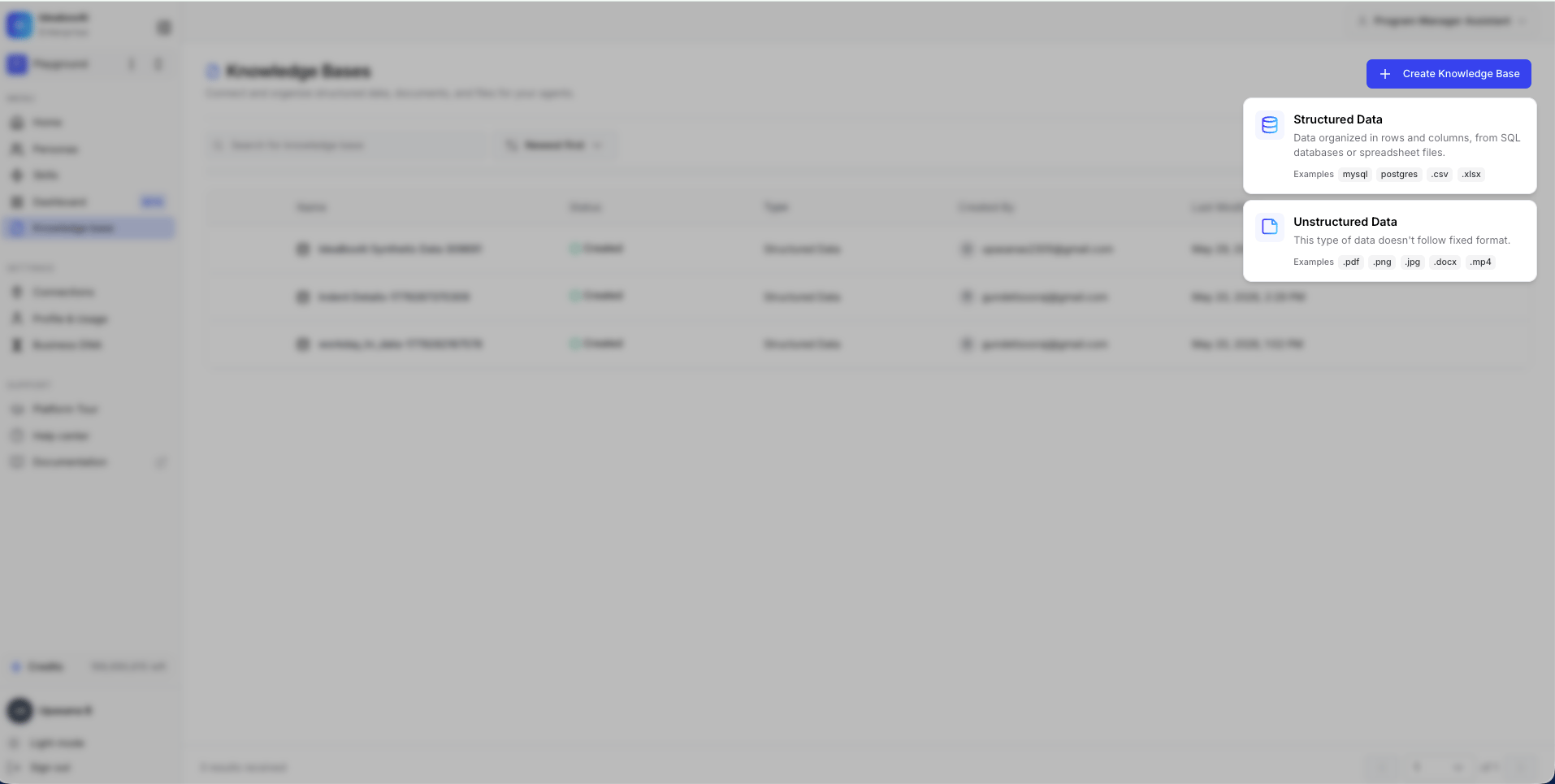 The system routes you to a type-specific configuration flow based on your selection.
Choose Structured Data only when relational integrity and schemas exist. Use Unstructured Data for documents intended for semantic search or AI reasoning.
**Best practices**
* Avoid mixing heterogeneous data types in a single knowledge base.
* Select the type that matches your data format and intended use case.
* Consider how agents will query the data before choosing.
### Configure knowledge base metadata
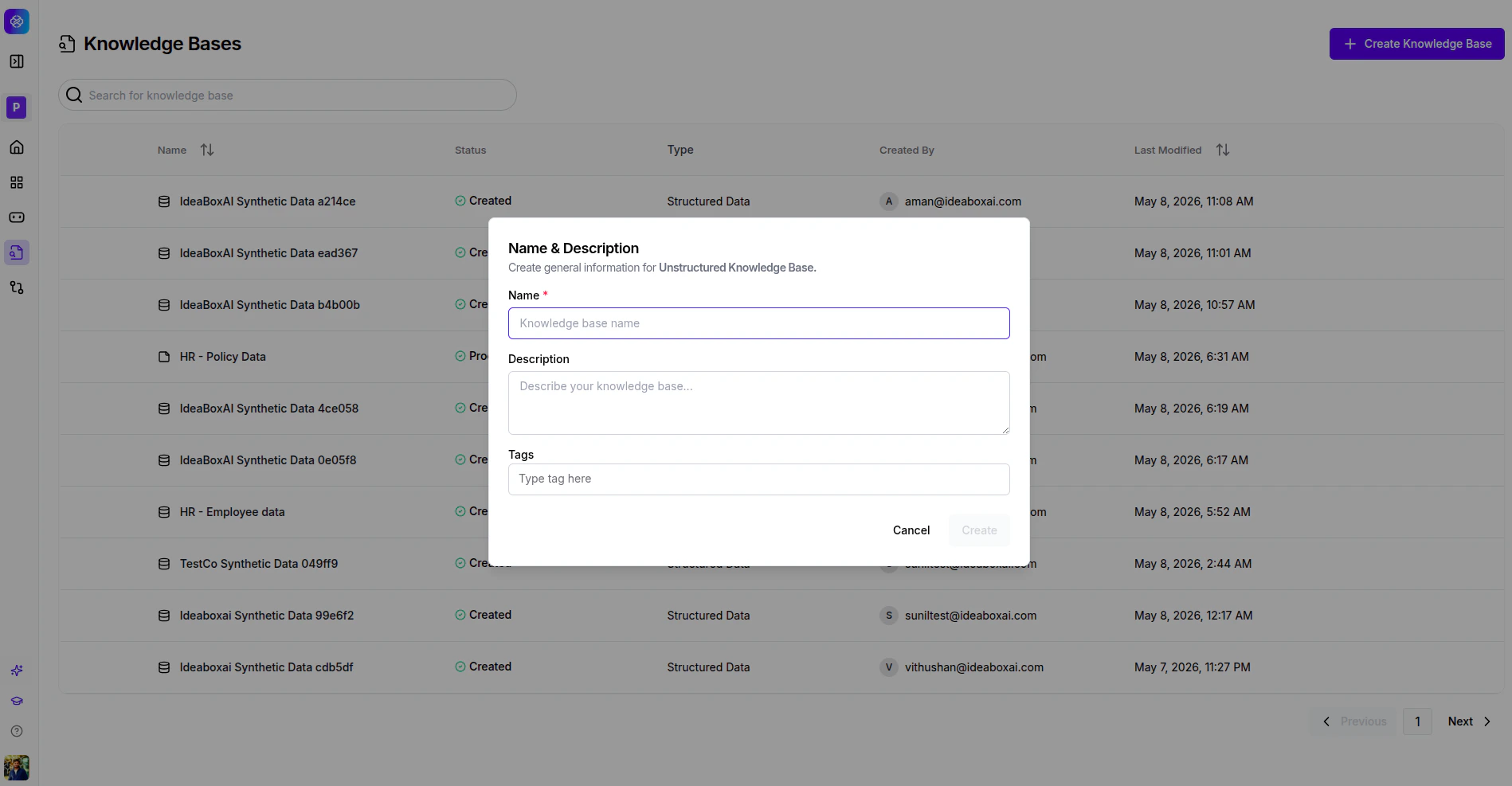
After selecting a type, the **Name & Description** modal appears. Fill in the following fields:
| Field | Description |
| ------------------- | ---------------------------------------------------------------------------------------- |
| **Name** (required) | A unique, descriptive identifier for the knowledge base. |
| **Description** | Explains the purpose and scope of the knowledge base. |
| **Tags** | Keywords for domain, team, or project association. Type a tag and press enter to add it. |
Click **Create** to initialize the knowledge base.
The system routes you to a type-specific configuration flow based on your selection.
Choose Structured Data only when relational integrity and schemas exist. Use Unstructured Data for documents intended for semantic search or AI reasoning.
**Best practices**
* Avoid mixing heterogeneous data types in a single knowledge base.
* Select the type that matches your data format and intended use case.
* Consider how agents will query the data before choosing.
### Configure knowledge base metadata
After selecting a type, the **Name & Description** modal appears. Fill in the following fields:
| Field | Description |
| ------------------- | ---------------------------------------------------------------------------------------- |
| **Name** (required) | A unique, descriptive identifier for the knowledge base. |
| **Description** | Explains the purpose and scope of the knowledge base. |
| **Tags** | Keywords for domain, team, or project association. Type a tag and press enter to add it. |
Click **Create** to initialize the knowledge base.
 ## Integrating with agents
Knowledge bases connect to AI agents. Once connected, agents can:
* Query unstructured documents to answer questions.
* Run analytical queries on structured data cubes.
* Combine multiple knowledge bases for comprehensive insights.
* Cite specific sources when providing answers.
To connect a knowledge base to an agent, navigate to the agent configuration and select the knowledge base from the dropdown.
## Next steps
Upload documents and connect external sources like Google Drive and Confluence.
Connect a database, explore schemas, and enrich metadata with AI.
Build analytical models with measures, dimensions, and queryable APIs.
## Integrating with agents
Knowledge bases connect to AI agents. Once connected, agents can:
* Query unstructured documents to answer questions.
* Run analytical queries on structured data cubes.
* Combine multiple knowledge bases for comprehensive insights.
* Cite specific sources when providing answers.
To connect a knowledge base to an agent, navigate to the agent configuration and select the knowledge base from the dropdown.
## Next steps
Upload documents and connect external sources like Google Drive and Confluence.
Connect a database, explore schemas, and enrich metadata with AI.
Build analytical models with measures, dimensions, and queryable APIs.