> ## Documentation Index
> Fetch the complete documentation index at: https://docs.ideaboxai.com/llms.txt
> Use this file to discover all available pages before exploring further.
# Sales Engineer persona
> Learn how to configure the Sales Engineer persona for technical discovery, demo prep, RFP responses, and POC planning.
In this tutorial, you will configure the Sales Engineer (SE) persona and walk through three common workflows: demo preparation, RFP response drafting, and prospect research. The SE persona is designed for users who own technical credibility and POC success. It provides structured discovery questions, demo configuration, RFP response drafting, and POC planning.
## What the SE persona provides
The following table summarises the primary use cases for the SE persona.
| Use Case | Problem Solved | Key Output |
| ---------------------------------- | ------------------------------------------------------------------------- | ------------------------------------------------------------------------- |
| Technical Discovery Questions | Discovery depth varies by SE experience; new SEs miss critical questions. | AI-generated discovery sets by industry, tech stack, and deal stage. |
| RFP / RFI Response Assistant | RFP responses take days; rewritten from scratch each time. | AI-drafted responses from approved answer library; gap flagging. |
| Demo Environment and Script Config | Manual demo prep; generic demos don't resonate. | Auto-configured demo scripts with environment setup checklists. |
| Technical Objection Handling | Technical objections stall deals; responses vary by SE. | Context-aware objection library with evidence-based responses. |
| POC Planning and Tracking | POC scope creep; success criteria unclear; no standard tracking. | Structured POC plans with competitive-aware scoping and milestone alerts. |
| Solution Architecture Summaries | Arch docs created ad hoc; knowledge lost when SEs move between deals. | Auto-generated architecture summaries: stack, integrations, data flows. |
## Set up the SE persona
In the Admin Console, click **Persona Management** and then **+ Create New Persona**.
* **Name:** Sales Engineer
* **Behaviour:** "You are a Sales Engineer. Help run structured technical discovery, prepare tailored demos, respond to RFPs and technical objections, plan and track POCs, and generate solution architecture documents. Ground all responses in internal knowledge bases, CRM data, and prospect context."
* **Enable Memory:** ON
Enable **Access Connections**, **Access Knowledge Base**, and **Browse Web** (SEs need web access for prospect tech stack research). Disable **Use Email Tools** unless SEs send directly from the platform.
Assign the following skills: Technical Discovery, RFP Response, Demo Prep, Technical Objection Handling, POC Planning.
Add starter prompts tailored to the SE role:
* "Generate discovery questions for \[industry] prospect"
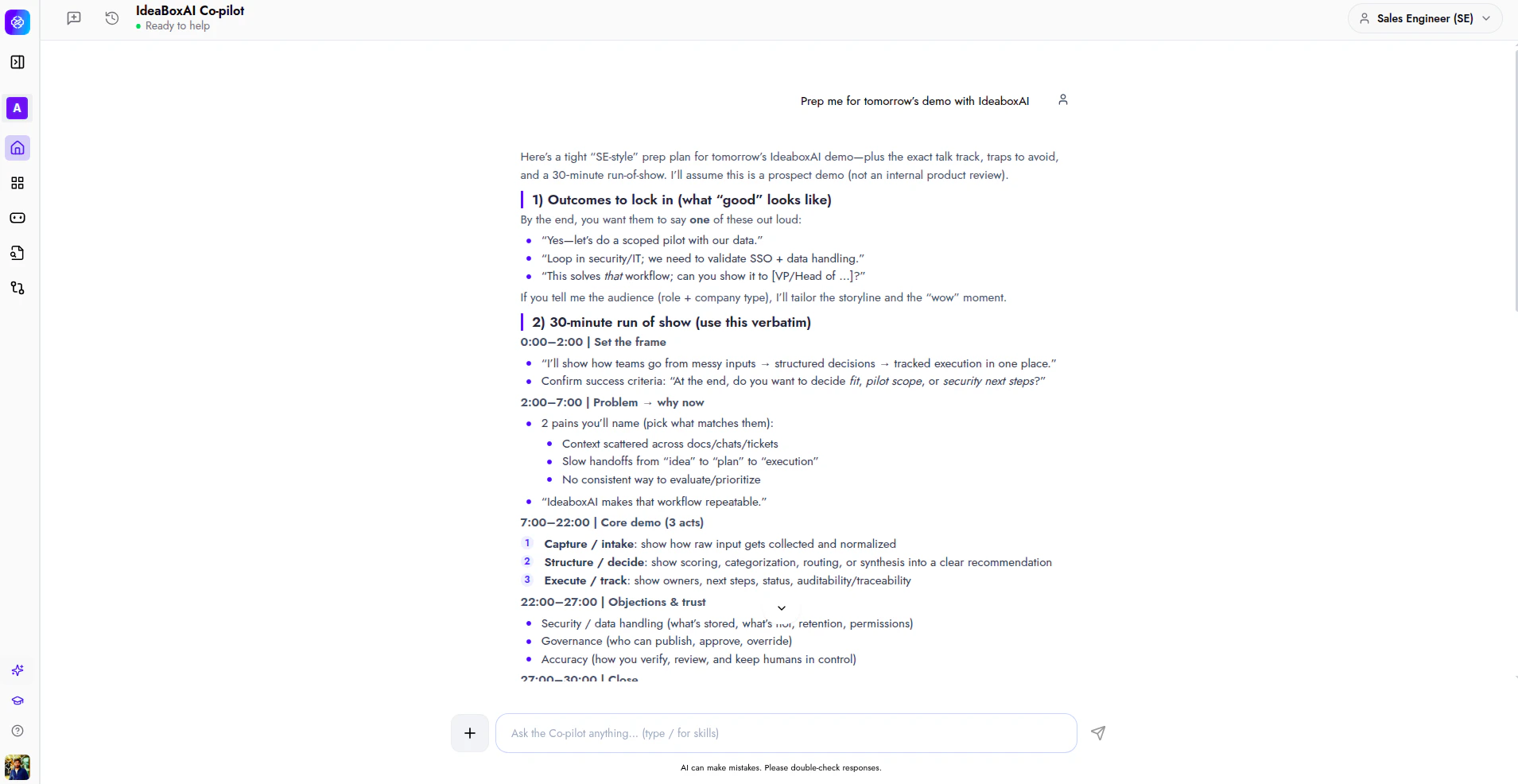
* "Prep me for tomorrow's demo with \[company name]"
* "Draft an RFP response for \[topic]"
* "What technical objections should I expect?"
* "Build a POC plan for \[company name]"
* "Create a solution architecture summary for \[deal name]"
Assign your SE team members to this persona.
## Example: demo preparation
This example shows how the SE persona generates a tailored demo brief from a single prompt.
*"Prep me for tomorrow's technical demo with Apex Dynamics. They are evaluating us against Snowflake for their data platform consolidation."*
The Co-pilot returns the following sections.
* **Technical context**: Current stack, evaluation driver, employee count, and deployment requirements.
* **Likely technical objections**: Specific objections mapped to the prospect's stack, with recommended responses and proof points.
* **Recommended demo flow**: A structured demo sequence tailored to the prospect's evaluation criteria and competitive position.
 ## Example: RFP response
This example shows how the SE persona drafts an RFP response from your approved answer library.
*"Draft an RFP response for data integration capabilities"*
The Co-pilot queries the approved answer library in your connected knowledge base and drafts a response following your standard format. If the answer library does not cover a question, then the Co-pilot flags the gap. The SE can review, edit, and export the response as a DOCX document.
## Example: prospect research
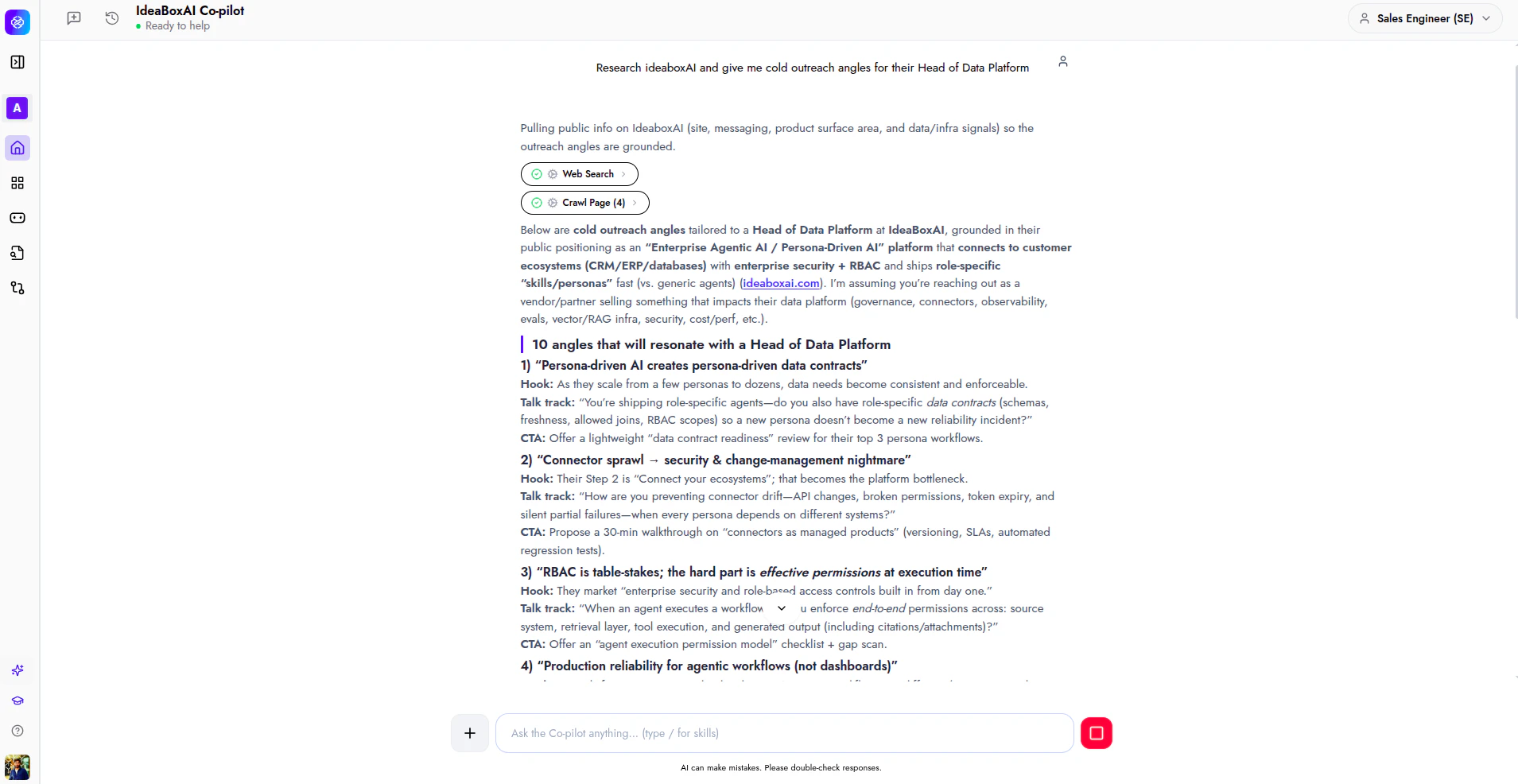
This example shows how the SE persona researches a prospect and generates cold outreach angles grounded in public data.
*"Research ideaboxAI and give me cold outreach angles for their Head of Data Platform"*
The Co-pilot runs a web search and crawls the prospect's public pages to gather product positioning, tech stack signals, and infrastructure context. It then generates targeted outreach angles, each with a hook, talk track, and call to action.
## Example: RFP response
This example shows how the SE persona drafts an RFP response from your approved answer library.
*"Draft an RFP response for data integration capabilities"*
The Co-pilot queries the approved answer library in your connected knowledge base and drafts a response following your standard format. If the answer library does not cover a question, then the Co-pilot flags the gap. The SE can review, edit, and export the response as a DOCX document.
## Example: prospect research
This example shows how the SE persona researches a prospect and generates cold outreach angles grounded in public data.
*"Research ideaboxAI and give me cold outreach angles for their Head of Data Platform"*
The Co-pilot runs a web search and crawls the prospect's public pages to gather product positioning, tech stack signals, and infrastructure context. It then generates targeted outreach angles, each with a hook, talk track, and call to action.
 ## Next steps
Now that the SE persona is configured, explore related tutorials to expand your setup.
Learn how to send prompts, hold multi-turn conversations, and generate documents.
Configure the AE persona for deal intelligence, meeting prep, and pipeline management.
Set up the SDR persona for prospect research and outreach generation.
Learn how to set up and manage data source connectors for your workspace.
## Next steps
Now that the SE persona is configured, explore related tutorials to expand your setup.
Learn how to send prompts, hold multi-turn conversations, and generate documents.
Configure the AE persona for deal intelligence, meeting prep, and pipeline management.
Set up the SDR persona for prospect research and outreach generation.
Learn how to set up and manage data source connectors for your workspace.