> ## Documentation Index
> Fetch the complete documentation index at: https://docs.ideaboxai.com/llms.txt
> Use this file to discover all available pages before exploring further.
# About skills
> Learn what a skill is, how it connects to personas, and why reusable skills give you the same reliable result every time.
A skill is a set of ready-made instructions you save once and reuse. It teaches a persona how to handle a specific task, like doing research, writing a report, or analysing data, so you get the same reliable result every time, without having to explain the task again from scratch.
For example, you could create a `market-competition-research` skill that always:
* Looks up information about a market or competitor.
* Reviews their positioning, pricing, strengths, and weaknesses.
* Writes it all up in the same clear format, a summary, competitor profiles, and a side-by-side comparison.
You build and manage skills in **Skills Studio**, then add them to one or more personas.
## How skills work with personas
You add a skill to a persona from the **Edit Persona** panel. Once it's added, the persona knows how to do that task. It can start the task on its own when your message calls for it, or you can pick it yourself by typing `/` in the chat and choosing it from the list.
The same skill can be added to as many personas as you like. For example, you could add one `market-competition-research` skill to both a Product Manager persona and a Sales persona. Both get the exact same research ability, while each keeps its own name, tone, and personality.
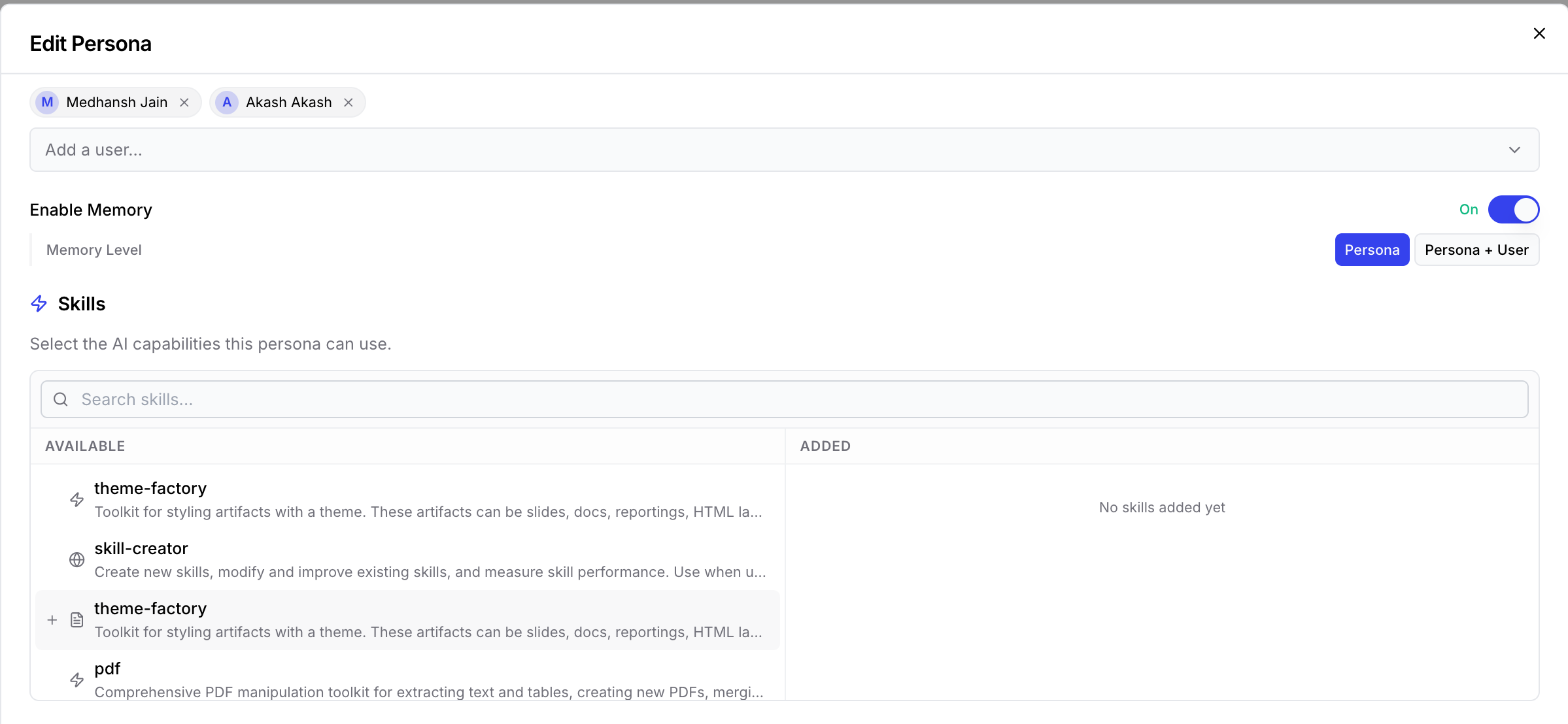 To add a skill to a persona, follow these steps.
Open the persona and click **Edit**.
Scroll down to the **Skills** section. Look through the **Available** list, or search for the skill you want.
Click the **+** next to a skill to move it into the **Added** column.
Save the persona. The added skills are now available in that persona's chats.
## Why skills are useful
Skills turn one-off instructions into a reusable capability your whole team can rely on.
* **Same result every time** - Every persona that uses a skill follows the same steps and produces the same kind of output, no matter who's asking.
* **Reuse instead of repeat** - Build a skill once and add it to as many personas as you need. You never have to write the same instructions twice.
* **Easy for new people** - New team members can use proven, ready-made workflows from day one.
* **Update in one place** - Change a skill once, and every persona that uses it is updated automatically.
* **Works on its own** - A persona can tell when a skill fits what you're asking and use it for you, so you don't have to remember which skill to pick.
Ready to build one? See [Create a skill with the co-pilot](/copilot/create-skill-ai) or [How to create a skill](/copilot/skills-and-configuration), then share it with your team using [Share a skill](/copilot/share-skill).
To add a skill to a persona, follow these steps.
Open the persona and click **Edit**.
Scroll down to the **Skills** section. Look through the **Available** list, or search for the skill you want.
Click the **+** next to a skill to move it into the **Added** column.
Save the persona. The added skills are now available in that persona's chats.
## Why skills are useful
Skills turn one-off instructions into a reusable capability your whole team can rely on.
* **Same result every time** - Every persona that uses a skill follows the same steps and produces the same kind of output, no matter who's asking.
* **Reuse instead of repeat** - Build a skill once and add it to as many personas as you need. You never have to write the same instructions twice.
* **Easy for new people** - New team members can use proven, ready-made workflows from day one.
* **Update in one place** - Change a skill once, and every persona that uses it is updated automatically.
* **Works on its own** - A persona can tell when a skill fits what you're asking and use it for you, so you don't have to remember which skill to pick.
Ready to build one? See [Create a skill with the co-pilot](/copilot/create-skill-ai) or [How to create a skill](/copilot/skills-and-configuration), then share it with your team using [Share a skill](/copilot/share-skill).